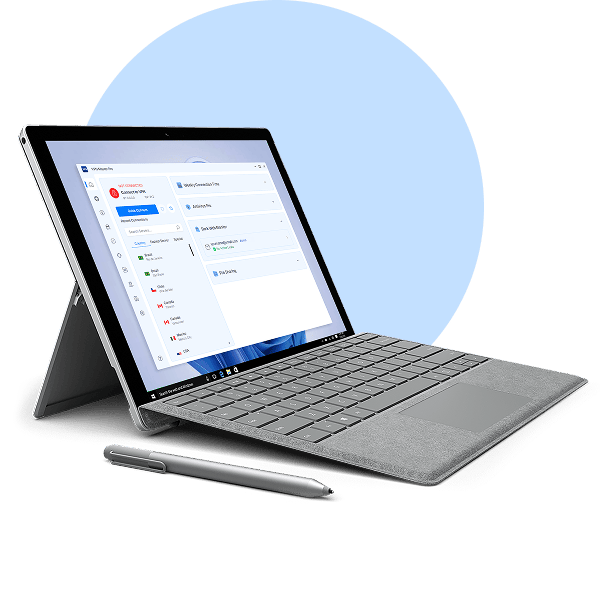
下載 Windows - VPN Master Pro

My IP Address is: 216.73.217.72, Country: United States, City:

Download a VPN for a Windows PC, laptop, or Surface Pro device

一鍵在 Windows 上隱藏 IP 並私密瀏覽。

Access content securely with one of the fastest VPN apps for Windows.

在 Windows 10(64 位元)或 Windows 11 上輕鬆設定 VPN Master Pro。

超值 85% 折扣 — 守護您的上網自由。
Windows VPN

What is a VPN for Windows?

Windows 專用的 VPN 是一款網路安全工具,在您使用 Windows 裝置瀏覽、串流或工作時保護您的線上流量。當您透過 VPN 用戶端連線至 VPN 伺服器時,您的網路連線會被加密,並取得 VPN 伺服器的 IP 位址。它讓您以更高的隱私與安全性探索網際網路。

A VPN for Surface Pro and other ARM devices

VPN Master Pro 是最早支援 Windows ARM 裝置(包括最新的 Surface Pro 系列)原生 VPN 實作的供應商之一。下載我們的 VPN 應用程式,讓您的線上活動免受窺探,並安心享受 ARM 架構 Windows 裝置的效能。

VPN for Surface Pro

How to set up the Windows VPN app

VPN Master Pro's app for Windows takes only a few moments to set up and is incredibly easy to use.

01
下載並安裝

Get a dedicated VPN Master Pro app for your device.

02
Sign up

註冊 VPN Master Pro 帳號。

03
Connect

Log in and connect to a VPN server.

手動 VPN 設定

Manual setup

想要手動設定您的 Windows VPN 嗎?手動設定所需的步驟取決於軟體版本以及您想使用的 VPN 協定。您可能還需要調整作業系統設定,為 VPN Master Pro 設定 Windows 防火牆。

Find the tutorials on our support page and tinker with your connection settings:

Instructions for manual OpenVPN setup

Why choose the VPN Master Pro app for Windows?

VPN Master Pro offers many additional security features VPN users like.

Secure streaming

Securely access streaming services from home without buffering, thanks to our fast servers and our SmartPlay technology work in magic.

Fastest connection

連線快速!速度最佳的 VPN 之一。憑藉遍布全球各地的數千台伺服器和我們的 VPN 協定,我們能夠提供市場上最快的連線之一。

分割通道

Pick and choose which apps, programs, or URLs are secured while leaving others out of the encrypted tunnel.

Meshnet

Securely access and share files on other devices or join virtual LAN parties with our Meshnet feature.

Easy to use

One click is enough to establish a secure VPN connection on all your devices.

Obfuscated servers

Connect to obfuscated servers to prevent others from seeing that you're using a VPN and blocking your VPN traffic.

ARM devices support

Use our native VPN app for Windows ARM devices to connect to VPN servers worldwide without a hitch.

If you need help, drop us an email or visit our Help Center for 24/7 assistance.

Get VPN Master Pro risk free

你的隱私是我們的首要。享最高 85% 優惠並獲得全面安心。

立即下载

常見問題集

是的,PC 有免費的 VPN。然而,並不建議使用它們。免費 VPN 提供與付費 VPN 相同的服務,這充其量也是有風險的。大多數免費 VPN 供應商透過向第三方出售你的資料牟利,並使用劣質的加密技術,使你的隱私與安全面臨風險。
如果您想為 Windows 裝置找到最佳的 VPN,可以以優惠價試用 VPN Master Pro。若您在註冊後 29 天內取消,將可獲得全額退款。

一款出色的 VPN 讓您安心享受線上生活,在不干擾您工作、串流和瀏覽的情況下提升您的安全。但最適合 Windows 的 VPN 應該遠遠超越其他 VPN 服務所提供的——它還應該提供多樣的 VPN 伺服器位置選擇、市場上最佳的 VPN 速度,以及眾多實用功能。
VPN Master Pro 在全球各地營運超高速 VPN 伺服器——您隨時都能選擇離您最近的伺服器,享受最佳的 VPN 體驗。憑藉我們專為速度與安全性優化的 VMPGuard、OpenVPN 及 WireGuard 協定,VPN Master Pro 目前提供市場上數一數二的 VPN 速度。
VPN Master Pro 還附帶額外的安全工具,提升您在 Windows 電腦上的線上體驗。例如,我們內建的 Web Security 可在您瀏覽時協助防範網路釣魚、詐騙與干擾式廣告,讓您安心暢遊網路。Windows 使用者還可享用私人雲端儲存,採用端對端加密與零知識架構,確保您的檔案安全無虞。

購買 VPN Master Pro 訂閱,即可同時在多達十部裝置上使用 VPN 服務。除了 Windows 11(以及其他 Windows 作業系統)之外,VPN Master Pro 也支援 macOS、iOS、Android、Linux,以及 Firefox 和 Chrome 的擴充功能。
若要保護您的網路流量,請在您的 Windows 裝置上開啟應用程式,登入您的帳戶,然後點按「快速連線」按鈕——它會為您連上目前速度最快的 VPN 伺服器。

是的,Windows 10 和 Windows 11 都具備作為虛擬私人網路運作的能力。不過,要在您的電腦上設定它,仍需要進行一些手動設定並具備相關技術知識。

Select the latest VPN Master Pro app version according to your Windows PC parameters.
The full VPN Master Pro version with all the latest features:
Download 64-bit app for Windows 10/11
為獲得最佳的安全性和效能,我們建議在最新版本的 Windows 上使用 VPN Master Pro。不過,如果您使用的是 Windows 7、Windows 8.1 或任何 32 位元版本,您仍然可以使用 VPN Master Pro 保護您的流量。請注意,我們適用於這些系統的應用程式已不再接收功能和安全性更新。
Download 64-bit app for Windows 7/8.1
Download 32-bit app for Windows

是的,VPN Master Pro 適用於大多數搭載 64 位元 ARM 處理器的 Windows 裝置,包括 Surface Pro 系列、HP Elite Folio、Lenovo Yoga 5G 和 Samsung Galaxy Book S。專屬的 VPN Master Pro 應用程式讓您只需點擊幾下,即可加密連線並變更 IP 位址。雖然威脅防護功能目前尚未在 ARM 架構裝置上推出,但我們的開發人員正在努力開發中。敬請期待!

若要中斷與 VPN Master Pro 伺服器的連線,請開啟應用程式並點按「中斷連線」。您可以選擇將 VPN 連線暫停 5、15 或 60 分鐘,也可以選擇完全中斷連線。

除了英文之外,VPN Master Pro Windows 應用程式還支援法文、德文、西班牙文、日文、繁體中文、韓文、義大利文、巴西葡萄牙文、簡體中文、瑞典文、荷蘭文和波蘭文。