How to reinstall VPN Master Pro on Android
In this tutorial, you will learn how to reinstall the VPN Master Pro application on your Android device.
Reinstall VPN Master Pro on Android
Follow the steps below to fully remove and cleanly reinstall the VPN Master Pro app on your Android device.
Step 1: Locate the App
Long‑press the VPN Master Pro icon and choose App info. Alternatively go to Settings > Apps > VPN Master Pro.
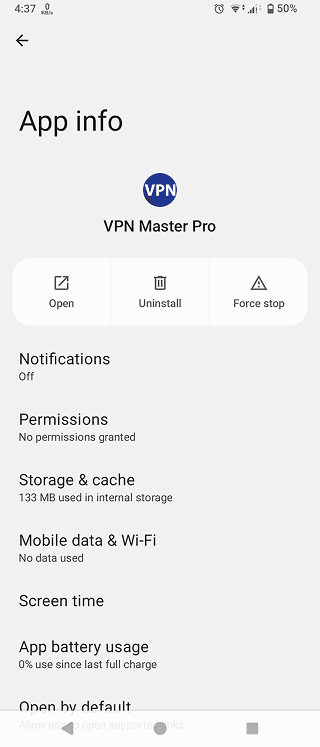
Clear App Data Before Uninstalling (optional)
Tap on "Storage & cache" and then "Clear Storage/Data". Then back on the app info screen.
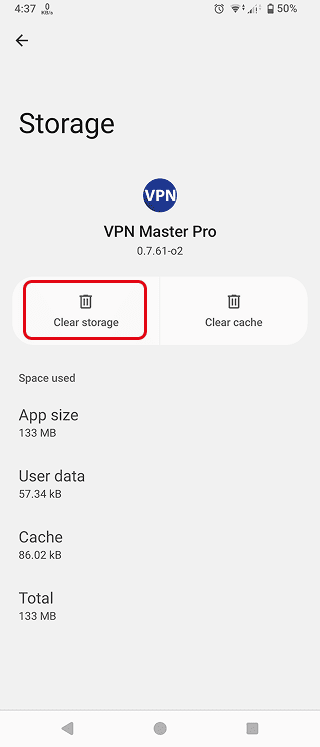
Step 2: Uninstall the Current App
Tap on "uninstall". Tap on "OK" to confirm.
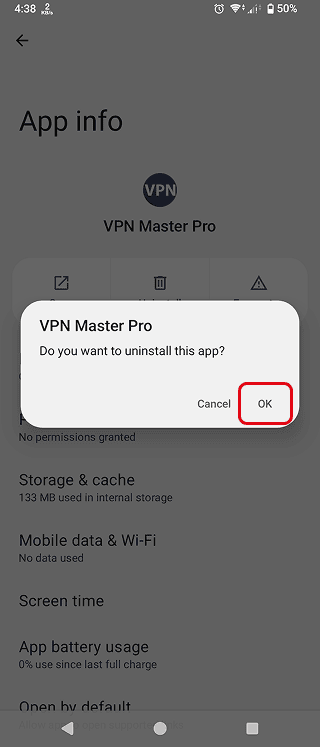
Step 3: Remove Old VPN Profile (If Present)
Go to Settings > Network & Internet (or Connections) > VPN. If any VPN profile remains, tap the gear icon or 3 dots and select Forget / Delete.
This prevents conflicts with the new installation.
Step 4: Restart Your Device
Rebooting clears cached processes and closes lingering VPN tunnels.
Step 5: Download the Latest Version
Visit the official download page: VPN Master Pro Download Page.
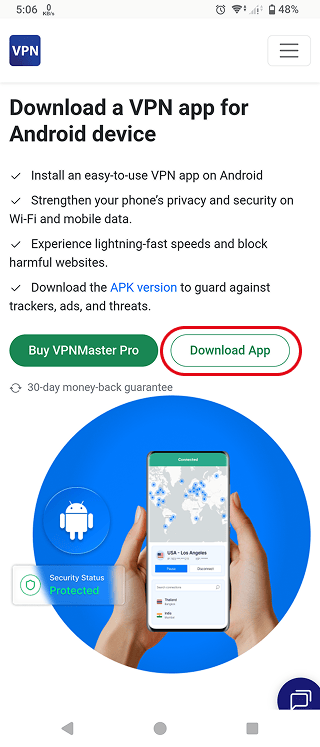
Step 6: Follow Setup Instructions
Now follow the article on How to setup VPN Master Pro on Android for full instructions.
Need More help?
If you are experiencing issues, please reach out to our support team for assistance.