How to allow VPN Master Pro Extension in private window on Firefox
Follow these steps to enable the VPN Master Pro Extension in private window on Firefox.
What is private window in Firefox?
Private window is a special browsing mode in Mozilla Firefox that allows you to browse the web privately. When you use Private window, Firefox does not save your browsing history, cookies, site data, or information entered in forms. This means that other users of the same device won’t see your activity.
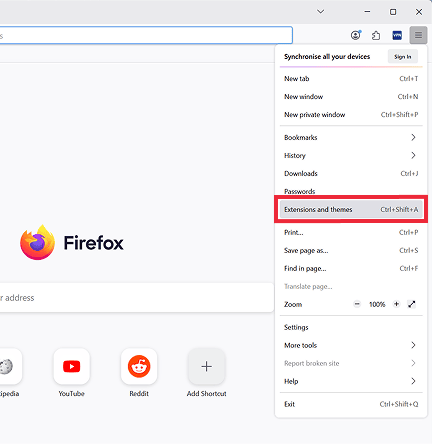
1: Click on Hamburger menu (three lines) at the top right corner, then click on "Extensions and themes".
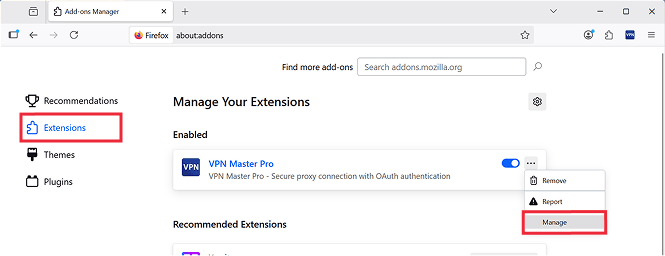
2: Make sure you are in the Extensions tab. Find VPN Master Pro Extension, click on three dots and select "Manage".
3: In the Details page, find the "Run in Private Windows" option and toggle it on.
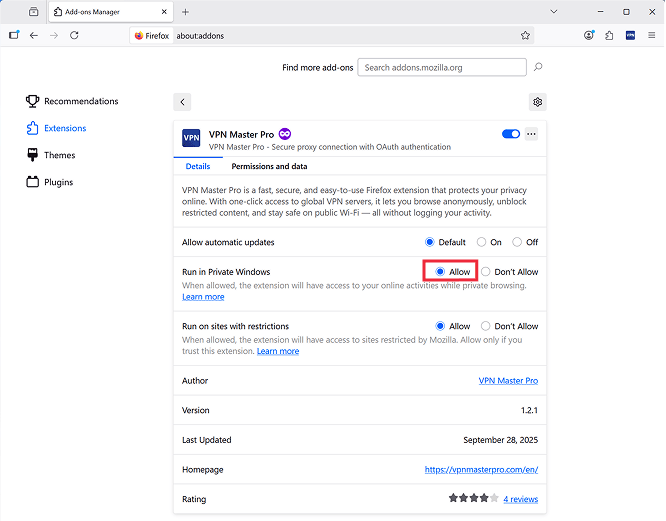
4: You have successfully enabled VPN Master Pro Extension in Private window on Firefox.
You can now use the VPN Master Pro Extension while browsing in Private mode on Firefox. Enjoy your private browsing experience your Firefox Browser.
Need More help?
If you are experiencing issues, please reach out to our support team for assistance.