A Virtual Private Network creates a secure, encrypted connection that shields your online activity from prying eyes. Learn how VPNs work and why they're essential for your digital privacy.
Just enter your email below to subscribe to the VPN Master Pro newsletter.
We won't spam you and you can unsubscribe at any time.
Using VPN apps makes your digital life safer, easier, and smoother.

Changing your IP address, hiding your virtual location, and encrypting your connection allow you to increase your privacy online.
A VPN shields you from cyber threats, like man-in-the-middle attacks, packet sniffing, and dangerous Wi-Fi networks.
With a VPN, you can avoid online censorship and restrictions and enjoy the free and open internet.
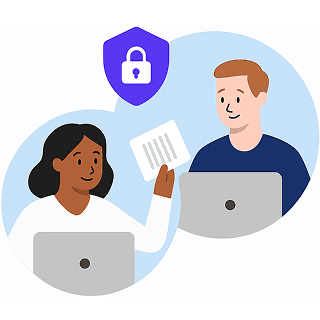
Share files securely while at home or at work — a VPN encrypts your connection so that no snoopers can see what data you're transferring.
No one likes to be watched or tracked – even if they have nothing to hide. That’s why it’s important you step up your privacy game. Here’s when you need a VPN:
Public Wi-Fi hotspots are a hacker’s playground. With VPN Master Pro, your data is fully encrypted — so your personal info stays hidden from snoopers and cyber threats.
Traveling abroad? VPN Master Pro lets you securely access your apps, streaming platforms, and social media as if you never left home — no geo-blocks, just freedom.
Forget DDoS attacks and throttled speeds. VPN Master Pro optimizes your connection for low-latency gaming and offers Meshnet for secure LAN parties with your friends.
Tired of slowdowns while watching your favorite shows? VPN Master Pro helps bypass ISP throttling and gives you smooth, high-speed streaming — wherever you are.
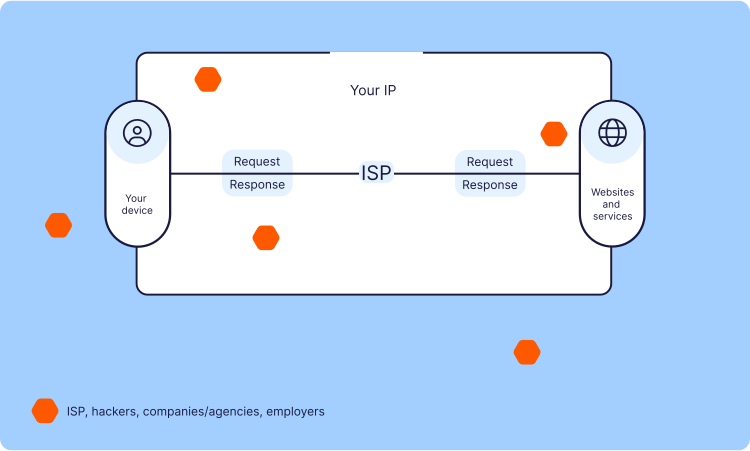
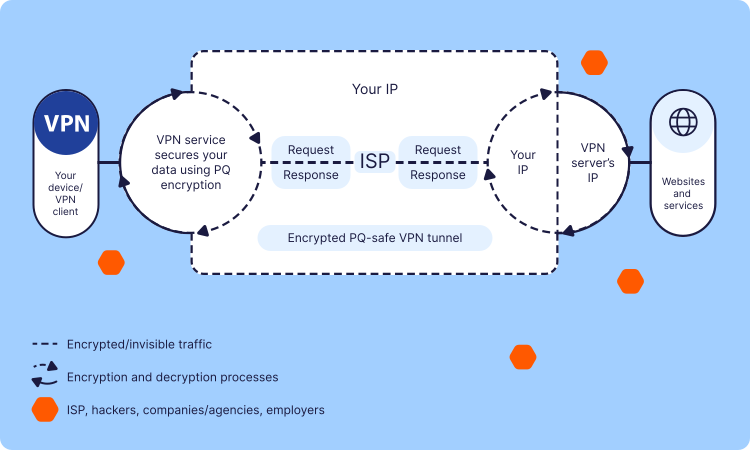
A VPN reroutes your internet traffic through a secure remote server while encrypting it along the way. Normally, your Internet Service Provider (ISP) sees everything you access online — and can log, throttle, or even sell your data. But with VPN Master Pro, your traffic is shielded and redirected, keeping your activity private.
First, VPN Master Pro hides your personal data from surveillance and tracking. Using strong encryption, it protects your browsing history and keeps your digital footprint invisible — ensuring no one can sell or exploit your online behavior.
Your IP (and, therefore, your virtual location) is also protected and you get a new one that belongs to the VPN server you’re connected to. This ensures extra security and significantly increases your privacy online — no one knows what city or country you’re browsing from.
Next, your IP address and virtual location are masked. Instead of showing your actual location, VPN Master Pro gives you a new IP from a remote server, adding a powerful layer of privacy and making it nearly impossible for anyone to trace your activity or location.
Start my ProtectionA VPN works by creating a secure encrypted connection between your device and a remote server. This way, your data can travel in secrecy instead of through your internet service provider. A VPN hides your real IP address and encrypts your internet connection to make your browsing safer and more private.
It’s worth finding out how a VPN works so you can make use of its full potential. Here’s what’s going on behind the scenes:
There are many types of VPN, but the vast majority of them fall into three main categories:
Everyday online protection for individuals
Most consumer-grade VPNs are classed as personal VPNs, including VPN Master Pro. They are very similar to remote-access VPNs in operation, but instead of connecting to a proprietary restricted network (such as your workplace), you connect to your VPN provider’s servers for protection and privacy while you explore the internet.
Connect branch offices with secure internal networks
Site-to-site VPNs are mostly used by businesses – large corporations in particular. They allow users in selected locations to access each other’s networks securely. It’s a great way to connect all offices and enable different branches to safely share resources and information.
Secure access to private networks from anywhere
A remote-access VPN allows users to connect to a remote network, usually by using special software. If you ever needed to log on to your office network, you most likely used a remote access VPN as well. It makes working away from the office safer and easier, as employees can access data and resources from anywhere.
What is a VPN with weak encryption? Just a surefire way to slow your connection down. When people use a VPN, privacy and speed are their main concerns. Different types of VPN protocols have different advantages, so most VPN providers offer at least two. VPN Master Pro lets users choose between VMPGuard, OpenVPN, and WireGuard protocols in its apps.
OpenVPN is the most popular encryption protocol, currently used by the majority of VPN providers in the world.
One of OpenVPN’s biggest strengths is that it is highly configurable. It also offers a nice balance between speed and security, as you can use it on both TCP and UDP ports. While the TCP port is a more stable option, UDP is faster, and many users prefer it for a seamless online gaming and live streaming experience.
L2TP/IPSec.Layer 2 Tunneling Protocol (L2TP) is a method for transmitting data from one device to another. As L2TP doesn’t offer any kind of encryption, it almost always comes together with Internet Protocol Security (IPSec), which negotiates the cryptographic keys to create a VPN-like environment. It’s a highly secure protocol but can be very slow because it encapsulates data twice.
PPTP. It is the most commonly used protocol that supports thousands of operating systems and devices. It’s also easy to set up, without the need to install additional software. However, PPTP is decades-old and not as secure as other protocols available today.
SSTP. Secure Socket Tunneling Protocol is a suitable alternative to standard protocols in areas where VPNs are controlled/limited. SSTP is similar to OpenVPN but it is owned by Microsoft, which means it is not available for independent auditing.
IKEv2 is a tunneling protocol, which is usually paired with IPSec for encryption. It has the ability to restore a secure connection after the internet drops and adapts well to changing networks. This functionality could be useful to smartphone users who often switch between home Wi-Fi and mobile connections or move between hotspots.
There are a few different ways you can set up your VPN. Have an encrypted connection wherever you go, join the VPN protection trend:
VPN Master Pro offers apps for all major platforms. It doesn’t matter if you use a Mac, an Android tablet, or a Windows laptop. We strongly believe that people shouldn’t struggle to protect their home network and mobile devices, so our apps are extremely user-friendly.
If you know what you’re doing, setting up your VPN just the way you want it is also an option. Bear in mind – manual setup will take more time, and mistakes are more likely to happen. Don’t worry – if you need some help, you’ll find detailed tutorials in our Help Center.
Install VPN Master Pro on your Wi-Fi router, and every device connected to it will be protected by bulletproof encryption. The process might seem a bit too complicated for novice users, but once you’re done, you can enjoy a safe internet connection without interruptions.
Your privacy is our priority. Save up to 85% while enjoying complete peace of mind.
Download NowGet answers to common questions about VPN technology and usage.