VPN Client for Windows, macOS, Android & iOS — VPN Master Pro

My IP Address is: 216.73.217.72, Country: United States, City:

A VPN client: Download VPN software and protect your traffic

Get a dedicated VPN app for instant connection.

Choose from different VPN protocols for the best speed and security.

Use VPN Master Pro on multiple devices at the same time.

Access VPN Master Pro’s advanced features.

Massive 85% Discount – Secure Your Freedom.
Fast VPN

What is a VPN client?

A VPN client is a software-based solution that establishes a secure, encrypted connection between your device and a VPN server. In other words, a VPN client service reroutes your internet traffic through a secure server, protecting your online activities from prying eyes. Most VPN providers have their own VPN client software, designed to allow easy access to the provider’s VPN servers and offer advanced security features.

How does a VPN client work?

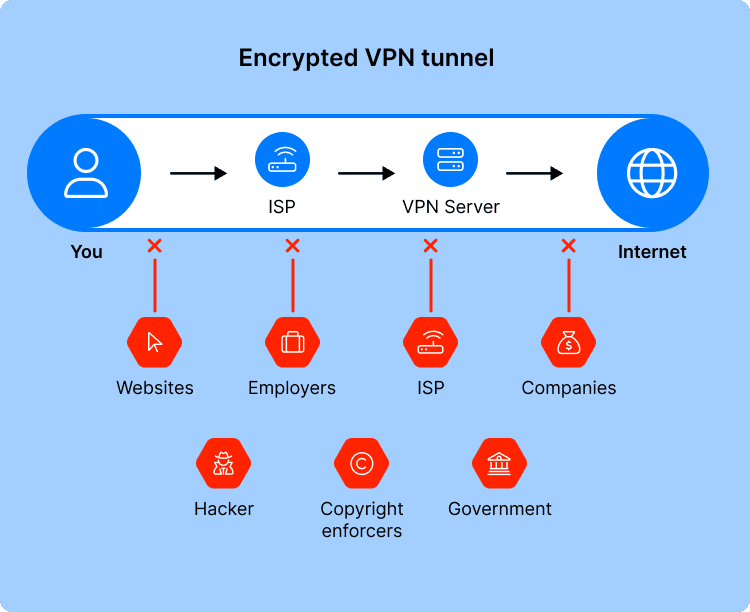
Your VPN client uses VPN protocols to create an encrypted “tunnel” between your device and your chosen VPN server. From that point on, all online traffic between you and the VPN server is encrypted and shielded from prying eyes. The VPN server decrypts the received data and safely passes it on to its final destination (such as a website).

How does a VPN client work?

Why use a VPN client?

Features

Installing dedicated VPN software can let you easily manage the extra perks that come with your VPN subscription. For example, the VPN Master Pro app has advanced options such as Threat Protection Pro, Dark Web Monitor, Meshnet, and other handy features.

Customization

A VPN client provides an intuitive interface for you to configure the VPN service to your needs. Customize your Kill Switch settings, set up Auto-connect for an easy start, select your preferred protocol — and that’s just the start.

Ease of use

Want to hop from Berlin to New York with the click of a button? You can do that with a VPN client. No need to manually type out commands and look up VPN server addresses — with the VPN Master Pro app, you simply tap a pin on the map.

Information

How many VPN servers are available in France? How busy are they? Without a VPN client, you would have to hunt down this information on the web or by using cumbersome text commands. A VPN client gives you everything you need to know.

Authentication

VPN clients let users easily sign in to their VPN service — it’s just like logging in to any other app. Thanks to the app’s graphical user interface, you don’t need to navigate the command prompt to access what you paid for or switch accounts.

Split tunneling

Split tunneling lets specific apps access the internet directly without turning off your VPN — but it can be very tricky to set up without visual cues. A VPN client can easily pick and choose apps to exclude from the secure VPN tunnel.

Types of VPN clients

There are three main types of VPN clients: system-based, protocol-based, and service-based.

System based (native)

Some operating systems offer native VPN clients, letting users establish a VPN connection without having to download any third-party software. This option is available on many Windows, macOS, Linux, and Android systems.

Protocol based

Several VPN protocol developers (such as OpenVPN and SoftEther) have created their own VPN clients. These clients are not tied to any single VPN provider — but they also typically only support VPN connections using the developer’s own VPN protocol.

Service based

Most VPN providers have their own VPN client apps. These VPN clients are configured to connect to the provider’s servers, let you freely choose between multiple VPN protocols, and usually offer extra security features (such as VPN Master Pro’s Meshnet.

Technical specifications for VPN clients

Check out what your devices need to run VPN Master Pro smoothly.

Manual VPN Setup

Requirements for the Windows VPN client

  • Application: Windows 10 (64-bit), Windows 11
  • Not supported: Anything older than Windows 7
Download VPN Master Pro for Windows
Manual VPN Setup

Requirements for the macOS VPN client

  • Application: macOS 10.14 (Mojave) or later
  • Not supported: Anything older than macOS 10.4
Download VPN Master Pro for macOS
Manual VPN Setup

Requirements for the Linux VPN client

  • Application: Linux (64-bit)
  • Not supported: Anything older than Linux (64-bit)
Download VPN Master Pro for Linux
Manual VPN Setup

Requirements for the iOS VPN client

  • Application: iOS 11 or later
  • Not supported: Anything older than iOS 11
Download VPN Master Pro for iOS
Manual VPN Setup

Requirements for the Android VPN client

  • Application: Android 9.0 or later
  • Not supported: Anything older than Android 9.0
Download VPN Master Pro for Android

Free vs. paid VPN client

There are plenty of free VPNs out there — so why choose a paid VPN instead of a free one?

If you’re using a free VPN to improve your online privacy, you might, in fact, be doing the opposite.

Remember — free VPN providers have to pay their bills just like everyone else. Free VPNs may try to cut costs by pushing ads, supporting only a few heavily loaded servers, and not investing in speed or connectivity. In rare cases, free VPNs might even resort to selling their clients’ data or using their devices as exit nodes for paying VPN users.

Paid VPN providers like VPN Master Pro offer both speed and security. With thousands of servers in all corners of the world, you’re bound to find one close by for the best possible VPN speed. And with advanced VPN encryption algorithms and useful extra features, the VPN Master Pro app stands out among the best VPN clients.

VPN Client

Best value for your money

Pick the best VPN Master Pro subscription to suit your digital security needs.

Get VPN Master Pro
Massive 85% Discount – Secure Your Freedom.
Frequently Asked Questions

What’s the difference between a VPN client vs. a VPN server, and which one do you need? Here’s a simple way to answer.
Setting up your own VPN server lets you choose where the remote exit node will be located. However, it is a complicated process — and without additional VPN servers, you will only be able to route your traffic through and change your IP to that particular exit node.
A VPN client from a reputable VPN provider like VPN Master Pro, on the other hand, lets you skip the difficult setup process and offers more VPN server options — but the catch is you’re limited to locations that the provider has installed a VPN server in. VPN clients also give you access to additional features.

If you are having trouble with your VPN client, you can try the following troubleshooting steps.
First, try connecting to a different VPN server — if you can connect fine, the original server may simply be down for maintenance. If that doesn’t work, log out of your VPN app, then log back in again. If you still have trouble connecting, try uninstalling the VPN client, rebooting your device, and installing the app again.
If the problem still persists, have a look at our article on what to do if your VPN is not connecting or contact our friendly customer support team for assistance.

Yes, Windows 10 comes with a built-in VPN client. To use it, you’ll need to download configuration files from your VPN service provider and set up the VPN connection manually.

To disable a VPN client, simply disconnect from the VPN in the app you’re using. For example, open the VPN Master Pro app and click “Disconnect.”

Two more minutes makes you harder to track